Converting 2D Images to Fake 3D Immersive Content: From Research to Scrollsequence V2
How we researched 2.5D parallax, AI depth estimation, and WebGL shaders—and brought real-time fake 3D depth parallax into Scrollsequence V2.
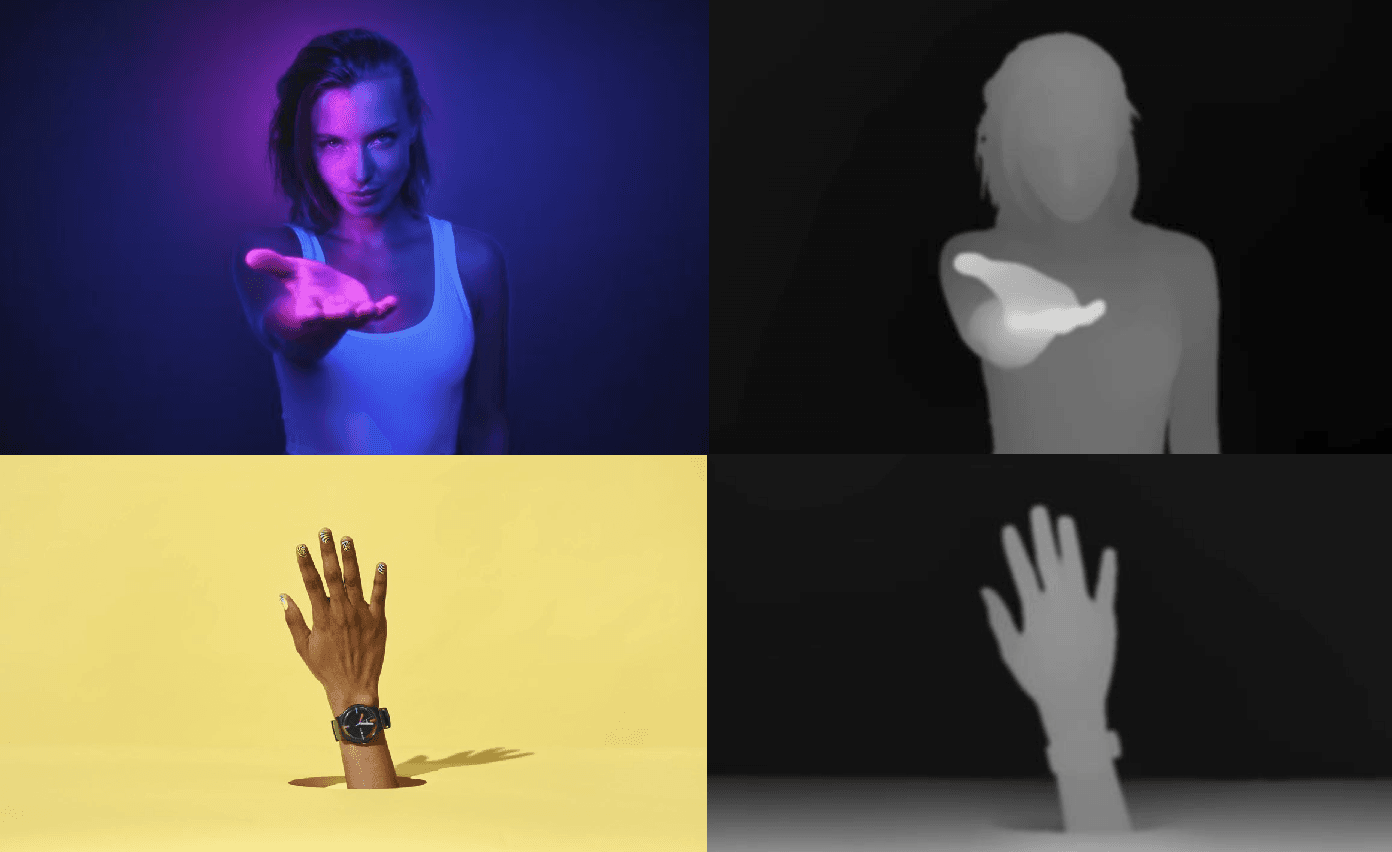
When planning the architecture for Scrollsequence V2, I wanted to push the boundaries of what is possible with scroll-driven web animations.
Scrollsequence V1 perfected high-performance, scroll-linked image sequence playback. You scroll the page, and the image frames advance seamlessly like a cinema reel. But for V2, we had a bigger vision: what if each frame could also respond to your mouse position or smartphone gyroscope in real time?
Think of the faux-3D parallax seen in Facebook 3D photos, Nintendo 3DS screens, or Apple Spatial photos: moving your cursor or tilting your phone lets you peer slightly around foreground objects, creating the illusion of genuine physical depth from flat 2D imagery.
A few months ago, I started an intensive deep research investigation into how to accomplish this. We evaluated cutting-edge AI depth estimation models, layered inpainting networks, GLSL fragment shaders, and WebGL runtimes to figure out how to generate and render 2.5D content at 60 FPS in the browser without hideous visual artifacts.
Here is the complete technical breakdown of that research—and how we ultimately brought hardware-accelerated 3D depth maps into Scrollsequence V2.
The Core Challenge: Monocular Depth & Occlusion
Creating a convincing 2.5D parallax effect from flat photos comes down to two distinct technical hurdles:
- Monocular Depth Estimation: Determining the relative distance of every pixel from the camera lens using only a single 2D image.
- Novel View Synthesis & Occlusion Filling: When the virtual camera pivots, what appears behind foreground subjects? Naive WebGL warping merely stretches edge pixels, causing ugly rubber-sheet distortion ("smearing"). A truly convincing effect requires either intelligent edge handling or generative "hallucination" of occluded areas.
To build this into a production-grade web tool, the solution had to meet strict requirements:
- Flawless 60 FPS: Rendering must remain butter-smooth on mobile devices and laptops.
- Minimal Asset Overhead: We cannot afford to stream massive 3D geometry files or dozens of alternate camera angles over the wire.
- Workflow Automation: Users must be able to convert standard image sequences or video clips with minimal manual labor.
AI Models and APIs for 2D-to-3D Depth
During our investigation, we explored the entire spectrum of open-source neural networks, specialized research pipelines, and commercial cloud APIs.
1. Monocular Depth Estimation Models
Convolutional Neural Networks (CNNs) and Vision Transformers (ViTs) can predict a continuous grayscale depth map from an RGB image:
- MiDaS & DPT (Intel / ETH Zurich): State-of-the-art vision transformers that excel at predicting relative depth across diverse real-world scenes.
- DepthAnything (V1 & V2): Extremely robust zero-shot monocular depth estimation with sharp boundary delineation.
- ZoeDepth & LeReS: Metric and relative depth models combining relative depth priors with local metric geometry.
These models output a single-channel grayscale depth map where pixel luminance represents distance (e.g., white = near, black = far). Depth maps are compact, compressible, and immediately usable by graphics shaders.
2. Depth + Layered Inpainting (“3D Photo”) Models
To solve the occlusion problem (seeing behind objects when tilted), researchers introduced layered depth representations:
- 3D Photo Inpainting (Shih et al., CVPR 2020): Takes an RGB image and depth map, segments depth discontinuities, and uses context-aware neural inpainting to synthesize color and depth for occluded background regions. It outputs a Layered Depth Image (LDI) or a 3D textured mesh. While the visual quality is outstanding, inference takes 10+ minutes per frame on high-end GPUs—making it impractical for multi-frame video sequences.
- SLIDE (Jampani et al., ICCV 2021): Single-image 3D photography using soft depth layering to handle semi-transparent elements, fine hair, and organic foliage.
- Stable Diffusion Depth2Img & Mesh Tools: Community workflows using diffusion models to outpaint occluded regions and bake 3D OBJ meshes. While visually flexible, the generated mesh files often exceed 100MB per image—far too heavy for standard web delivery.
3. Shader-Based Warping Pipelines (DepthFlow)
If full layered inpainting is too slow for sequences, how do video tools achieve clean 2.5D parallax?
- DepthFlow (by BrokenSource): An open-source toolkit (also available as ComfyUI DepthFlow Nodes) that converts an image and depth map into smooth parallax video using GPU-accelerated GLSL shaders.
- DepthFlow avoids heavy inpainting by using intelligent texture warping, edge dilation, and constrained camera orbits. It can process high-resolution frames at 50+ FPS on consumer GPUs (e.g. RTX 3060), proving that smart shader math can produce artifact-free parallax without multi-layer hallucination.
4. Client-Side In-Browser AI (Tiefling)
Could depth generation happen live in the visitor's browser?
- Tiefling.app (GitHub): An MIT-licensed web experiment that runs DepthAnything V2 directly in the browser via ONNX Runtime Web, then renders 3D parallax using Three.js.
- While it proves client-side WebGL tilt is viable, running depth inference in JavaScript takes 15–30 seconds per frame even on modern laptops. This confirmed that depth maps must be precomputed ahead of time on the server or CLI, rather than evaluated on the client.
5. Turnkey Commercial Cloud APIs
- Immersity AI (formerly LeiaPix): Cloud platform providing proprietary multi-layer 2D-to-3D depth generation and motion extrapolation. Excellent quality, but introduces recurring subscription costs and external API dependencies.
- Luma AI: Neural rendering and camera fly-through generation via diffusion. Generates cinematic video loops, but lacks real-time interactive canvas controls.
Comparison of 2D-to-3D Approaches
| Approach / Model | Description & Output | Pros | Cons / Notes |
|---|---|---|---|
| 3D Photo Inpainting*(Shih et al. 2020)* | Input: RGB image + depth.Output: Layered Depth Image (LDI) with inpainted background layers. Generates MP4 or 3D mesh. | High quality; cleanly synthesizes unseen background areas. Open source. | Very slow (~10 min/image on GPU). Heavy assets; impractical for sequences. |
| SLIDE*(Jampani et al. 2021)* | Soft depth layering with unified inpainting network. | Handles fine strands (hair, foliage) without sharp halo tears. | Complex multi-stage model; not plug-and-play. High compute requirements. |
| DepthFlow*(BrokenSource)* | Input: RGB + depth.Output: Real-time GLSL shader projection with camera trajectory controls. | Blazing fast (50+ FPS on GPU). Smooth parallax without server overhead. | No native background fill; relies on constrained motion and edge dilation. |
| Tiefling*(Browser 2.5D)* | Pure JavaScript: in-browser depth inference (DepthAnything V2 via ONNX) + Three.js rendering. | Zero server setup; runs client-side. Open source (MIT). | Client inference is sluggish (15–30s/image). Best as a WebGL rendering reference. |
| Immersity AI*(Cloud API)* | Commercial cloud API generating multi-layer depth media. | Great turnkey quality with minimal effort. | Proprietary SaaS with per-image API credits and data privacy concerns. |
| Luma AI*(Video Gen)* | Diffusion / NeRF camera animation generator. | Highly cinematic and creative motion paths. | Output is fixed video, not interactive real-time mouse/gyro canvas. |
Real-Time Canvas Rendering: Mesh vs. Shader Warping
Once an image has an accompanying depth map, how do we render it interactively at 60 FPS on HTML5 Canvas? We analyzed two primary architectures:
Approach A: 3D Geometry Extrusion (Three.js Mesh)
In this method, a subdivided PlaneGeometry is displaced along the Z-axis using the depth map as a displacement map:
- Pros: True 3D perspective camera controls, native shadows, and easy integration with Three.js scene graphs.
- Cons: A dense grid capable of rendering 1080p without stair-stepping requires over a million vertices. At high frame rates, continuous mesh vertex displacement strains mobile GPUs and consumes excessive memory.
Approach B: GLSL Fragment Shader Warping (Full-Screen Quad)
Instead of manipulating heavy 3D geometry, render a single quad covering the canvas and calculate parallax per-pixel in a custom WebGL fragment shader:
// Offset texture coordinates based on normalized depth (0 = far, 1 = near)
vec2 offset = uMouseOffset * (texture2D(uDepthMap, vUv).r * uTiltIntensity);
vec2 warpedUv = vUv + offset;
gl_FragColor = texture2D(uImage, warpedUv);- Pros: Negligible geometry overhead (just 4 vertices for the quad), instantaneous texture lookups, and guaranteed 60+ FPS even on budget smartphones.
- Taming Artifacts: To prevent edge tearing and pixel smearing:
- Parallax Clamping: We limit the maximum camera tilt angle (e.g. ±10°). Subtle parallax delivers 90% of the immersive 3D illusion without exposing occluded seams.
- Canvas Edge Zooming: Applying a slight scale factor (e.g.
1.05x) ensures canvas boundaries never show blank borders during tilt.
How We Implemented It in Scrollsequence V2
Armed with the research findings, we designed the native 3D depth system for Scrollsequence V2 around two pillars: an automated asset pipeline and a zero-overhead WebGL runtime.
1. The Asset Pipeline: Precomputing Grayscale Depth
Rather than burdening website visitors with client-side AI or forcing developers to pay for costly cloud APIs, we integrated automated monocular depth generation directly into the Scrollsequence CLI:
# Extract frames, optimize resolutions, and generate AI 3D depth maps
npx scrollsequence vid2ssq hero-animation.mp4 --sizes 720,1280,1920 --depth --depth-width 720
Because depth maps represent smooth, low-frequency geometric information rather than crisp color detail, our asset pipeline generates lightweight 720px grayscale depth maps and links them under the files.d property in your scrollsequence-manifest.json:
{
  "images": {
    "count": 120,
    "sizes": [
      {
        "width": 1920,
        "files": {
          "c": "images/1920/%04d.webp",
          "d": "depthmaps/%04d.webp"
        }
      }
    ]
  }
}
Learn more in the Asset Pipeline Documentation.
2. The Rendering Engine: Automatic WebGL Detection
In both our React Component (<Canvas2d>) and the Vanilla JavaScript Engine, Scrollsequence automatically inspects your media manifest:
- If no depth maps exist, it uses standard 2D canvas drawing routines.
- If
files.dis present, it transparently initializes a hardware-accelerated WebGL 2.5D shader that tracks mouse coordinates on desktop and gyroscope orientation on mobile.
You can customize the 3D effect with simple props or data-ssq-* attributes:
import { Scene, Layer, Canvas2d } from 'scrollsequence/react';
import manifest from '@/public/hero/scrollsequence-manifest.json';

export default function DepthHero() {
  return (
    <Scene duration={1800} triggerStart={0.5} triggerEnd={0.5}>
      <Layer>
        <Canvas2d
          manifest={manifest}
          depthMapsTilt={1.8}   {/* Parallax displacement intensity */}
          depthMapsZoom={1.06}  {/* Scale padding to prevent border clipping */}
        />
      </Layer>
    </Scene>
  );
}
3. See It in Action
Here is the live result in Scrollsequence V2. Move your cursor across the viewer (or tilt your mobile device) to experience the real-time 2.5D depth parallax interacting with the scroll-driven sequence:
Key Takeaways
- Precompute on the Server / CLI: Running vision neural networks in the browser is still too heavy for instant page loads. Generating depth maps upfront in your asset pipeline guarantees instant 60 FPS delivery.
- Share Depth Across Resolutions: You don't need 4K depth maps for 4K video. A 720p grayscale depth sequence weighs only a fraction of the RGB payload and can be shared across mobile and desktop tiers.
- Constrain Motion for Maximum Realism: Subtle parallax looks magical; extreme parallax exposes missing occluded textures. Keeping camera travel within a tight orbit (±5–10°) provides high-fidelity depth with zero tearing.
- Shaders Beat Meshes for Performance: For interactive web hero sections, a WebGL fragment shader on a simple quad outperforms heavy 3D mesh displacement in memory consumption, load times, and frame rate stability.
To start using 3D depth maps in your own projects, check out our React Integration Guide, explore the Vanilla Engine Documentation, or try out the CLI via the Asset Pipeline Guide.
References and Sources
- Shih et al., "3D Photography using Context-aware Layered Depth Inpainting," CVPR 2020 — Paper & Code on GitHub | Replicate Model
- Jampani et al., "SLIDE: Single Image 3D Photography with Soft Layering and Depth-aware Inpainting," ICCV 2021 — Project Page | CVF Paper
- BrokenSource DepthFlow — GitHub Repository | ComfyUI Nodes
- Tiefling 2D-to-3D Viewer — GitHub Repository | Live Web App
- Immersity AI — Official Website & API
- Luma AI — Image-to-Video & Dream Machine
- Google Research Blog — The Technology Behind Cinematic Photos
- Reddit Discussion — 2D to 3D Parallax Image Converter Discussion
- Windows Community Toolkit — Depth Map Shader Parallax Discussion
Read more
From video to scroll animation - DIY with ffmpeg, or free with Scrollsequence vid2ssq
Scrubbing an MP4 with currentTime stutters. The reliable pattern is frames on a canvas. Here's the generic DIY path, then what free npx scrollsequence vid2ssq adds (multi-size tiers, optional depth maps and vision for agents).
Video Scroll in Webdesign: The Ultimate Guide
Everything you need to know about video scroll animations in 2026: how they work, the 3 technical approaches, performance, SEO, and how Scrollsequence modernizes the workflow.

Scroll Image Animation: The Complete Guide (2026)
A comprehensive guide to scroll-driven image sequence animations: history, real-world examples, performance, SEO, and the best implementation methods across WordPress, GSAP, Motion, Anime.js, and Scrollsequence.